Theme editor

  • RequestStream Movies, TV shows and anime streaming • 1 week trial
  • LewdCorner Update
    For now, mime and apollo have full control over LC and will be handling site decisions going forward. I’m stepping back from making site changes for now and letting them decide how to move LC forward. - Jack Of Blades
    Read More
I liked it, even if its another Headmaster game its quite diffrent of the other ones. I give thumbs up!
yea the questline are pretty difficult to follow without walkthrough, maybe an ingame walkthrough or more infos how to progress in the Journal would be good.
also looking forward for more content with the patch.
 
I'll admit that the loli in this game is a bit weird. They look like adult models that have just been reduced in size, they don't have childish facial expressions, and despite declaring in the game that they are between 8 and 11 years old, they all have breasts.
 
With the redesign are we losing the two lower schools that were originally planned?
 
Headmaster called; they want their game back. Also where are the lolis?
 
Seriously where are the Lolis? I added the patch to my game, but it didn't seem to do anything.
 
In the last update where the campus layout changed, they were mostly edited out. I tried loading some of my saves to remember where/how I did it, but clicking on anything is resulting in error cascades.

I haven't really touched this one in 4 months, but a quick look through gave me this much:
After the patch, when you start the game you need to activate the developer console and set
Code:
loli_content = 2
to unlock both middle and elementary schools. Aside from some random screens/encounters, only high school has any content.
 
In the last update where the campus layout changed, they were mostly edited out. I tried loading some of my saves to remember where/how I did it, but clicking on anything is resulting in error cascades.

I haven't really touched this one in 4 months, but a quick look through gave me this much:
After the patch, when you start the game you need to activate the developer console and set
Code:
loli_content = 2
to unlock both middle and elementary schools. Aside from some random screens/encounters, only high school has any content.
What if we are not developers and don't know what a developer console is, how do we change this?


Also are there any changes that were made to change high school ages to be actual high school ages and not the "get through censors so all girls are 18 or 19" ?
 
Developer console is a way of making the game accept written commands, like for example "money = 999" which would set your money to 999 (this is just an example which would be based on the game having a money variable and naming it "money".

Developer console is often "locked down" by the game developer, but in RenPy it is rather easy to re-activate. I'll explain how further down. If developer console is not locked down, it is activated by pressing shift + o ( or in some cased alt + o ).
You will get a grey screen with text on it, like this:
1735763588927.png

And then you can type commands. As the poster above wrote "loli_content" is a variable that is used in this game. If you type just that (loli_content) and press enter, the game will tell you the current value of that variable. If you write what the above poster suggested "loli_content = 2" the game will change that variable to the value "2", and I assume that in this game that will activate loli content.

Now, if the dev console is locked down, it must be activated. To do this we must do a very small and simple edit of a textfile in the game. You will need to use Notepad if you are on Windows, or any other text editor that saves in the TXT format.

Go to the folder [gamename]/renpy/common
Find the file named 00console.rpy and open it with Notepad. On Win, you rightclick and choose open with. Or open Notepad first, and open this file from within Notepad,
If you are unsure about what you're doing, first make a backup copy of this file.
OBS! Do NOT open the file 00console.rpyc !! Note the C at the end.

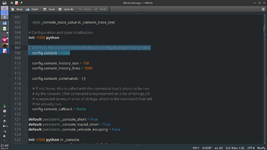
When you've opened the file 00console.rpy, find the lines that look like this:
# If true, the console is enabled despite config.developer being False.
config.console = False

This should be line number 107-108 of ca 1200 lines, so shy of 1/10th down. You can do a search in the text to find them.

1735764610897.png
Now comes the "hack", and it is very easy.
Just replace the word False with the word True, by simpling erasing and typing.
Yes, the first letter has to be a capital, and the blank spaces need to be there to (at least i think they need to be, and better safe...)
1735764737350.png
Save the file under the same name.

Congrats, you are now a hacker. ;)


( my screenshots look different since they are done with another program than Notepad )


I can also recommend a universal mod for renpy games, called Universal Ren'py Mod, but it can be a bit confusing if one is not already familiar with variables and other things.
 
Last edited:
Developer console is a way of making the game accept written commands, like for example "money = 999" which would set your money to 999 (this is just an example which would be based on the games developer naming the money variable "money".

Developer console is often "locked down" by the game developer, but in RenPy it is rather easy to re-activate. I'll explain how further down. If developer console is not locked down,it is activated by pressing shift + o ( or in some cased alt + o ).
You will get a grey screen with text on it, like this:
View attachment 479100

And then you can type commands. As the poster above wrote "loli_content" is a variable that is used in this game. If you type just that (loli_content) and press enterthegame will tell you the current value of that variable. If you write what the above poster suggested "loli_content = 2" the game will change that variable to the value "2", and I assume that in this game that will activate loli content.

Now, if the dev console is locked down, it must be activated. To do this we must do a very small and simple edit of a textfile in the game. You will need to use Notepad if you are on Windows, or any other text editor that saves in the TXT format.

Go to the folder [gamename]/renpy/common
Find the file named 00console.rpy and open it with Notepad. On Win, you rightclick and choose open with. Or open Notepad first, and open this file from within Notepad,
If you are unsure about what you're doing, first make a backup copy of this file.
OBS! Do NOT open the file 00console.rpyc !! Note the C at the end.

When you've opened the file 00console.rpy, find the lines that look like this:
# If true, the console is enabled despite config.developer being False.
config.console = False

This should be line number 107-108 of ca 1200 lines, so shy of 1/10th down. You can do a search in the text to find them.

View attachment 479102
Now comes the "hack", and it is very easy.
Just replace the word False with the word True, by simpling erasing and typing.
Yes, the first letter has to be a capital, and the blank spaces need to be there to (at least i think they need to be, and better safe...)
View attachment 479103
Save the file under the same name.

Congrats, you are now a hacker. ;)


( my screenshots look different since they are done with another program than Notepad )


I can also recommend a universal modfor renpy games, called Universal Ren'py Mod, but it can be a bit confusing if one is not already familiar with variables and other things.

Thanks for the information on this, it is very much appreciated
 
That was a great, in-depth write-up of enabling and using the console, probably better than I could have done. I will add that There is a simple way to overwrite the disabled console with a separate file instead of editing the 00console.rpy:

Navigate to [gamename]/game/ and create a new file. You can call it something like enable-console.rpy. Open that file with a text editor and add the following text (from "init" until the second "True"):
Python:
init 999 python:
    config.developer = True
    config.console = True

As mentioned above, setting the values to True will let you open the developer console. The first line tells renpy to run this file last during game start-up. This will overwrite the disabled value set earlier. This small file can also be added to most any other renpy game to enable consoles in them, as well.
 
So the reason it would be a games plus title is no longer going to be part of the game and it can go back to the regular games list with the rest of the big utter games. The current version does not even put those schools on the map and the dev is not trying to develop them further after having a hard enough time getting the base game to function. Do I understand that correctly?
 
How do you add the patch on android?
 
This is not games + ... the patch does nothing .....

Suit-Ji9/9/24, 6:44 AM​

Yes they work, but the loli one is dropped since I just have no capacity to support 3 classes of which two are probably not visible for most of the people
 
Last edited:
so the loli path is completely abandoned?
 
So, does this game have anything going for it since it doesn't have loli? and why is it in games+?
haven't played it
 
So, does this game have anything going for it since it doesn't have loli? and why is it in games+?
haven't played it
maybe...... i wont even give it a look because of the lack of loli .... i will just stick to playing The headmaster ..... honestly i get dis interested in a game that claims to have something that it does not now or used to have.... this game needs to be moved to regular section so non member+ individuals can see it and choose to play it
 
This is unfortunate. Not only did the loli get removed, but it also means about two-thirds of the dev's original plan for the game and its potential have been removed/abandoned. This is not a very good sign for the chances of it getting finished properly.
 
Last edited:
Game only has class 3a in it even with the patch, there's only 9 girls left in the game, there used to be like 25...it's amazing how they think dropping content is gonna fix their game...all you did was fully kill it.
 
Back
Top Bottom