Theme editor

  • RequestStream Movies, TV shows and anime streaming • 1 week trial
  • LewdCorner Site Cleanup Update
    A new cleanup update has been posted covering the recent Vault rework, rank changes, policy cleanup, and theme polish. The goal is to make LC cleaner, easier to understand, and safer for the site going forward. - Jack Of Blades
    Read More
  • use the latest updates page in the main menu for recently updated games (we are still fixing this section.)

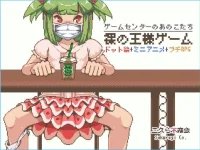
Complete RPGM Hand Drawn Naked Kinga Game -kids Of The Arcade Center [v1.01] [ Sakuragi Co]

jkj34

Older than the net remembers free www creativity
Registered
Lewd
Prestige 1
Prestige 2
Prestige 4
Prestige 5
Joined
Nov 24, 2022
Threads
53
Messages
748
Vouches
0
Likes
973
Activity Coin
9,052
Donation Coin
0
Platinum Coin
11
LewdCoins
⚡162
1/3
‎3 Years of Service‎
Thread owner
Allow others to update?
  1. yes
Developer Name
Sakuragi Co.
Developer Links
N/A
Version
1.0 (Finished)
Latest Update
Oct 8, 2018
Release Date
Jan 1, 2015
Language
english
OS
  1. Windows
1713866749233.png
Overview:
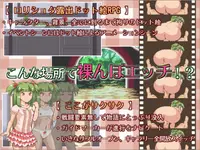
You play as a trio of young rascals who dare each other to do all kinds of embarrassing things in the neighborhood park and arcades. Bound by the honorable “Ousama (king) game,” even the usually level-headed Ichigo is strung along the antics of her sex-crazed friends. Will she be able to survive their playful dares or succumb to the pleasure…?

The game has no official site anymore its english old but still works on windows 10.​

oon/enf/clothing change/rpgm
extract/run
n/a
n/a
exb/oon

Download:
Win
- -


1712637265037.webp1712637291326.webp
 
Last edited by a moderator:
Ah.. this game is very great art.
I play long time ago.
 
Thread owner
Ah.. this game is very great art.
I play long time ago.

Do you remember how to get ending #2 got everything but that hmm
 
Is there no way to make this game go double window size or full screen? F1 => fullscreen doesn't work, F4/F5/F6 do nothing either, alt-enter or ctrl-enter neither. Any other tricks?
 
Is there no way to make this game go double window size or full screen? F1 => fullscreen doesn't work, F4/F5/F6 do nothing either, alt-enter or ctrl-enter neither. Any other tricks?
I ended up just setting my Windows display scale to 175%. While terrible, it at least makes it playable without squinting my eyes. Couldn't find any better solution :(

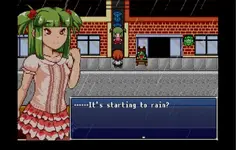
Game actually has pretty nice custom drawings and animations. It's pretty linear, but I actually prefer that.
 
Thread owner
I ended up just setting my Windows display scale to 175%. While terrible, it at least makes it playable without squinting my eyes. Couldn't find any better solution :(

Game actually has pretty nice custom drawings and animations. It's pretty linear, but I actually prefer that.

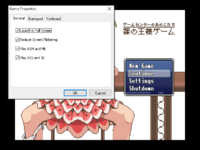
When you load it up hit F1 a popup window is shown first option is to launch it in full screen so click that then close app fire it back up :)
 
When you load it up hit F1 a popup window is shown first option is to launch it in full screen so click that then close app fire it back up :)
I tried this, but unfortunately it didn't work. The game would just stay windowed when restarting. Pressing F1 again confirmed the checkbox was checked.

Thanks for suggesting anyway :)
 
Thread owner
I tried this, but unfortunately it didn't work. The game would just stay windowed when restarting. Pressing F1 again confirmed the checkbox was checked.

Thanks for suggesting anyway :)

hmm odd windows 10/11? or older try compatibility mode mine works see screenshot but i am on a older windows pc
1726025761149.png
 
hmm odd windows 10/11? or older try compatibility mode mine works see screenshot but i am on a older windows pc
View attachment 347107
Windows 11. I tried compatibility mode for Win7 but it didn't work. Looking at the size of your "Game Properties" window compared to your game window it doesn't really scale either ;)

Anyway, adjusting Windows Display Scale worked well enough for me for now. Your help is appreciated.
 
Thread owner
Windows 11. I tried compatibility mode for Win7 but it didn't work. Looking at the size of your "Game Properties" window compared to your game window it doesn't really scale either ;)

Anyway, adjusting Windows Display Scale worked well enough for me for now. Your help is appreciated.

i am at 300% scale all the time as i am on a 55inch 4k 120hz panel sitting back good 7-8ft ft so 480pish game full screen does that :).
 
Back
Top Bottom