

1/3
3 Years of Service
- Developer Name
- Yaminato Studio
- Developer Links
- Version
- 1.0
- Latest Update
- Apr 5, 2026
- Release Date
- Apr 5, 2026
- Language
- English, Japanese
- OS
- Windows

Overview:
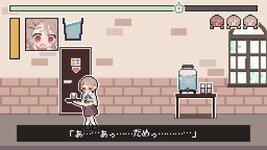
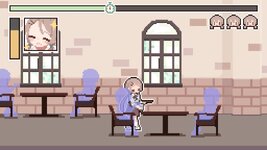
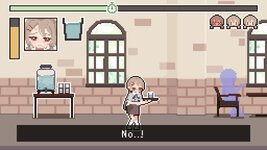
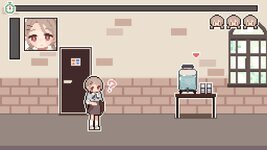
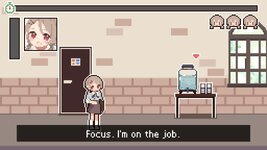
A simulator where, under a strange suggestion triggered by moving water, you must keep serving water to customers during your shift.
You are an ordinary college girl. One day, without realizing it, a senior coworker at your part-time job leaves you with a strange suggestion:
"Watching water move makes you feel an intense urge to use the restroom."
Deliver water to customers before your shift ends.
Stay on top of incoming orders and keep the café running smoothly.
If the pressure overwhelms you before your shift is over, it's game over.
Find time to step away when you can, and do your best to keep working until the end.
The Suggestion Deepens.
Each stage you clear increases the hypnosis level.
As the days go by, new suggestions begin to affect your thoughts, slowly disrupting your everyday life.
Some localization for languages other than Japanese was initially created using machine translation tools.
These translations may be revised or replaced with human translations in future updates.
No AI-generated content was used for the game's artwork, audio, or story.
This game contains themes related to urinary urgency and accidental wetting.
Some scenes depict restroom situations and include illustrations where underwear may be visible.
Each stage you clear increases the hypnosis level.
As the days go by, new suggestions begin to affect your thoughts, slowly disrupting your everyday life.
Some localization for languages other than Japanese was initially created using machine translation tools.
These translations may be revised or replaced with human translations in future updates.
No AI-generated content was used for the game's artwork, audio, or story.
This game contains themes related to urinary urgency and accidental wetting.
Some scenes depict restroom situations and include illustrations where underwear may be visible.
Female Protagonist, Dot / Pixel, Fetish, Panties, Peeing Oneself, Trance / Suggestion, Urination / Peeing, No Penetrative Sex
Extract and run
The non-Japanese sections in this file are currently machine-translated. They will be replaced with human translations at a later date.
Yuremizu
Player Guide
[How to Launch]
1. Extract the distributed folder to any location.
2. Double-click Yuremizu.exe in the folder to launch the game.
3. If a Windows warning appears on first launch, verify the distributor before running it.
[Controls]
- WASD, Arrow Keys, Left Stick: Move
- Enter Key, Confirm Button: Interact
- Space Key: Fast-forward cutscenes
- Right Mouse Button, Enter Key: Skip the opening cutscene
[Options]
- Invincibility Time: When enabled, the game will not end due to exceeding the order cancellation limit or toilet use limit.
- Ignore Time Limit: When enabled, the game will not end even if the time limit is exceeded.
[Streaming and Video Content]
Streaming and uploading gameplay videos of this game is allowed.
However, the creators accept no responsibility for any problems, damages, or losses arising from such streaming or video uploads.
[About Save Data]
This game stores save data and settings in the following location:
C:\Users\<Username>\AppData\LocalLow\YaminatoKobo\Yuremizu\
Main save file:
SaveFile.es3
[How to Delete Save Data]
1. Exit the game.
2. Open the following path from the Explorer address bar or with Win + R:
%USERPROFILE%\AppData\LocalLow\YaminatoKobo\Yuremizu
3. Delete SaveFile.es3.
Deleting save data will reset your progress, unlocks, and various settings.
[制作者]
闇なとあおい:
やました:
Yuremizu
Player Guide
[How to Launch]
1. Extract the distributed folder to any location.
2. Double-click Yuremizu.exe in the folder to launch the game.
3. If a Windows warning appears on first launch, verify the distributor before running it.
[Controls]
- WASD, Arrow Keys, Left Stick: Move
- Enter Key, Confirm Button: Interact
- Space Key: Fast-forward cutscenes
- Right Mouse Button, Enter Key: Skip the opening cutscene
[Options]
- Invincibility Time: When enabled, the game will not end due to exceeding the order cancellation limit or toilet use limit.
- Ignore Time Limit: When enabled, the game will not end even if the time limit is exceeded.
[Streaming and Video Content]
Streaming and uploading gameplay videos of this game is allowed.
However, the creators accept no responsibility for any problems, damages, or losses arising from such streaming or video uploads.
[About Save Data]
This game stores save data and settings in the following location:
C:\Users\<Username>\AppData\LocalLow\YaminatoKobo\Yuremizu\
Main save file:
SaveFile.es3
[How to Delete Save Data]
1. Exit the game.
2. Open the following path from the Explorer address bar or with Win + R:
%USERPROFILE%\AppData\LocalLow\YaminatoKobo\Yuremizu
3. Delete SaveFile.es3.
Deleting save data will reset your progress, unlocks, and various settings.
[制作者]
闇なとあおい:
You must be registered to see links
やました:
You must be registered to see links
Download
Win/Linux:
Win/Linux:
You must be registered to see links
- - -
Last edited by a moderator:


