Theme editor

  • RequestStream Movies, TV shows and anime streaming • 1 week trial

Complete Unity Hand Drawn Living with my Little Sister (Uncensored) [Steam] [Flash Club]

nice and thanksi was gonna do the but i didnt know the right way and didnt want to mess it up
Alright so just so you and everyone else know what to do if it happens in the future (And it surely will)
I normally only do this if either just one or none of the links work mainly because if people have more than one option I think it's alright.
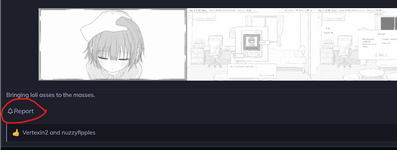
But whenever you want to file a report for broken links obviously you have to click on the "🔔Report" button that's in every game thread at the end of the main post:
Captura de pantalla 2026-06-18 141553.png
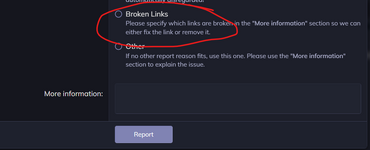
Once you do that, a list will pop up displaying the different reasons of why you want to report that post, for the of sake this example I just captured the last part of the list where it shows the "Broken Links" option, you have to click that and at the end of the list where it says "More information" you have to write all the links that aren't working.

A lot of people use only one browser to enter LC, which is not a problem until they want to download a game and one of the links shows a message saying the site didn't load or that they can't access that link from their browser, if that ever happens to you I would recommend you try to open that same link from another browser just to confirm if it actually works or not, if the site opens and the archive is still there please don't report it as broken.

I personally open every link before reporting a post so I can give accurate information about that post, then once you know what links are really broken just write something like "X, Y & Z links are down" and click on report and that's all, after that you just have to wait for someone to update the post, you'll get a notification when that happens.
Captura de pantalla 2026-06-18 141716.png
 
Last edited:
Alright so just so you and everyone else know what to do if it happens in the future (An it surely will)
I normally only do this if either just one or none of the links work mainly because if people have more than one option I think it's alright.
But whenever you want to file a report for broken links obviously you have to click on the "🔔Report" button that's in every game thread at the end of the main post:
View attachment 776520
Once you do that, a list will pop up displaying the different reasons of why you want to report that post, for the sake this example I just captured the last part of the list where it shows the "Broken Links" option, you have to click that and at the end of the list where it says "More information" you have to write all the links that aren't working.

A lot of people use only one browser to enter LC, which is not a problem until they want to download a game and one of the links shows a message saying the site didn't load or that they can't access that link from their browser, if that ever happens to you I would recommend you try to open that same link from another browser just to confirm if it actually works or not, if the site opens and the archive is still there please don't report it as broken.

I personally open every link before reporting a post so I can give accurate information about that post, then once you know what links are really broken just write something like "X, Y & Z links are down" and click on report and that's all, after that you just have to wait for someone to update the post, you'll get a notification when that happens.
View attachment 776521
awesome explanation that made complete sense and ill definitely be saving this comment for the future thank you for the help much appreciated
 
Back
Top Bottom