Theme editor

  • RequestStream Movies, TV shows and anime streaming • 1 week trial
  • LewdCorner Site Cleanup Update
    A new cleanup update has been posted covering the recent Vault rework, rank changes, policy cleanup, and theme polish. The goal is to make LC cleaner, easier to understand, and safer for the site going forward. - Jack Of Blades
    Read More
  • use the latest updates page in the main menu for recently updated games (we are still fixing this section.)
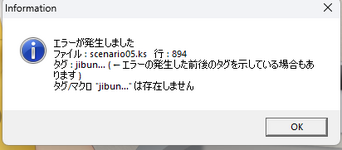
I have Japanese installed as a language in Windows. I moved the program to the OS drive. Nothing works. It gives an information popup only. KIRIKIRI stays running in the background after trying to run it, too.
I don't know why you don't have a problem running it.
I don't know why the uploader can't replicate it.
I do know that anything causing this much trouble isn't worth the hassle.
Enjoy.
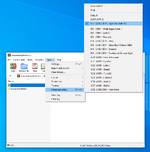
 
@Luckytaste made me understand the problem: windows native uncompress function, as well as 7-zip, made a mess of file names while unzipping, thereby even using local emulator the game was unable to properly load. I changed the unicode language FOR the unzipping, and not the game works.
 
Damn, was hoping to find a solution to the Shopkeep's Favor bug but it seems like it's just other people having the problem with no luck.

1717100750445.png
 
for thos having an issue with launching the game, you need to unzip it with JIS encoding...
for example in winrar, go to options => names encoding => select the japanese one
 
- Download game

- Download Kirikiroid APK from attached files and install it (don't forget to give permissions in app settings)

- Open app and all you you need to do is locate the game's files on kirikiroid2 then tap data.xp3 (or for older kirikiri games, look for data folder/name.exe)
 

Attachments

Damn, was hoping to find a solution to the Shopkeep's Favor bug but it seems like it's just other people having the problem with no luck.

View attachment 179629
paste this scenario5 file over the already existing one, that did the trick for me. Tbh tho there isnt really new content after this one new cutscene in the shop
 

Attachments

Edit: Never mind i'm such a Gonk

For the ignorant (me) any tech wizard willing to give a little tutorial on the localization thing one need to do to start the game? i have no clue what it is, where i get and how i use it (i know nothing)
 
Last edited:
- Download game

- Download Kirikiroid APK from attached files and install it (don't forget to give permissions in app settings)

- Open app and all you you need to do is locate the game's files on kirikiroid2 then tap data.xp3 (or for older kirikiri games, look for data folder/name.exe)
Thanks it work, just changed to japanese language to extract the game, no need to move the folder
 
Does this have ending or we just max to lvl 4 and do same thing till got bored?
 
going off the screenshots its censored but lacks the censored tag so my question is can anyone tell me if the game is censored
I'm not 100% sure about this particular version. I can tell you I played an uncensored version that I downloaded from somewhere else (not sure if I'm allowed to say?) before this was posted here, so there is an uncensored version out there. Also, if you make the distinction (I do) it was de-censored, not proper uncensored, so it's not the highest quality. Better than mosaics or bars, but disappointing all the same.
 
Hello, if you're having issues with the game, it's likely because the extraction isn't properly converting the file names to Japanese and instead the names are coming out grabled.

For Linux you can do:
unzip -O shift-jis <zipFileName>

In WinRAR:
You have to go to Options->Name Encoding->Japanese Shift-JIS

Then the data files should come out with the proper text.

I know this last thread is quite old, but I didn't see another solution here. It can work for other Japanese games as well.
 
Back
Top Bottom