
You are using an out of date browser. It may not display this or other websites correctly.
You should upgrade or use an alternative browser.
You should upgrade or use an alternative browser.
- Thread starter Neytan
- Start date
- Replies 454
- Views 181K
Versions
Log in for version alerts
5.00 star(s)
3 reviews


3 Years of Service
The guy who makes this mod has not been seen online since August. (according to Cuck95) So I suspect the chances for it being updated are slim. :/Do we have a chance to get an updated walkthrough mod for v0.6?

3 Years of Service
oh that's a pity but thanks for your infoThe guy who makes this mod has not been seen online since August. (according to Cuck95) So I suspect the chances for it being updated are slim. :/

4 Years of Service
This game is good right now, but will be amazing once we get past all of the SMOL teasing 

3 Years of Service
Well, I saw that the modder is another that has gone poof this past summer, seem to many did, but given a try on the 1-2 punch of the Universal Mods I got from another site, and this seems like it works. At the very least until another modder steps up to take over this game. Figured I would go ahead and share them here for anyone who wants to go with a fix for now on having a mod for this game. 
From the modder for the first one...
Overview:
After doing some other universal mods,
I decided to give it a try with a WT mod.
Mod works in real-time.
Mod may not show every variable changes.
Mod may show not accurate variable changes.
Mod doesn't show up if there isn't at least two selectable choices.
And it doesn't show same variable changes present in all selectable choices.
Variable changes are dependent on previous choices.
Meaning: Choice variable changes may differ based on previous choices.
And highest points changes may not lead to best outcomes.
Modder: @ZLZK
Mod Version: 2024-01-24
Ren'Py Version: any (untested below 6.99.13)
Features:
Spoiler
Installation:
Spoiler
PC: Unzip both archives and merge "game" folders in game's root directory.
Configuration:
Spoiler
If you want to change mod options,
you can do it in "_mods/ZLZK/_mods/UCD/config.py" file.
Global mod options in "_mods/ZLZK/config.py" file.
Info about config files in "_mods/ZLZK/doc/config.txt" file.
From the modder for the second one...
Overview:
Easiest installation, open mod by pressing Alt+M (see below for touchscreen devices)
This mod is a great tool to cheat or debug Ren'Py games. See full Features list below for details.
Some features in short:
Find, change, freeze and monitor variables, detect hidden choices, detect paths, rename any character, find/save/replay scenes, watch variables, skip splashscreen, textbox customizing, customizable quickmenu
Features:
Spoiler
Roadmap:
Spoiler
Installation:
Spoiler
Extract the file "0x52_URM.rpa" into the "game" folder, and start the game
Touch devices (e.g. Android):
Spoiler
This mod also supports touchscreen devices. But the build/port of the game needs to support mods! (if it works, you'll get a URM popup after start/loading a game)
You can open the mod by drawing an U on screen (swipe down-right-up).
When URM detects a touchscreen it will also put a draggable button on screen to open URM (you can disable this through the options).
Spoiler: Install on Android
The easiers way would be to use JoiPlay. But some Android versions of Ren'Py games support mods, in that case you could try:
From the modder for the first one...
Overview:
After doing some other universal mods,
I decided to give it a try with a WT mod.
Mod works in real-time.
Mod may not show every variable changes.
Mod may show not accurate variable changes.
Mod doesn't show up if there isn't at least two selectable choices.
And it doesn't show same variable changes present in all selectable choices.
Variable changes are dependent on previous choices.
Meaning: Choice variable changes may differ based on previous choices.
And highest points changes may not lead to best outcomes.
Modder: @ZLZK
Mod Version: 2024-01-24
Ren'Py Version: any (untested below 6.99.13)
Features:
Spoiler
- Display of variable changes in selectable menu choices.
- Display of variable changes in graphic menus on hover.
Installation:
Spoiler
PC: Unzip both archives and merge "game" folders in game's root directory.
Configuration:
Spoiler
If you want to change mod options,
you can do it in "_mods/ZLZK/_mods/UCD/config.py" file.
Global mod options in "_mods/ZLZK/config.py" file.
Info about config files in "_mods/ZLZK/doc/config.txt" file.
From the modder for the second one...
Overview:
Easiest installation, open mod by pressing Alt+M (see below for touchscreen devices)
This mod is a great tool to cheat or debug Ren'Py games. See full Features list below for details.
Some features in short:
Find, change, freeze and monitor variables, detect hidden choices, detect paths, rename any character, find/save/replay scenes, watch variables, skip splashscreen, textbox customizing, customizable quickmenu
Features:
Spoiler
- Search variables (including persistent variables)
- Search values (including persistent variables)
- Change values (including persistent variables)
- Freeze variable (prevent them from changing)
- Monitor variables (get a notification when it changes)
- Search and play labels/scenes
- Recursive search (search your previous search results)
- Load/save results to/from a file
- Watch variables/labels during play through (watchpanel)
- Character renaming and text replacement (in dialogues and choices)
- See/modify choices (
You must be registered to see links)
- You can also see hidden choices and select them
- Show the conditions on which a choice is visible
- See python code behind a choice
- Change the choice text
- Detect paths / if-statements
- Select paths you're not on
- Show conditions for a path
- See Python code behind a path
- Extensive load/save options
- Quick resume: Immediately load this save after starting the game (skipping the title screen and menu)
- Named saves: Enter a description for your saves
- Copying: Make a copy of a save
- Moving: Move a save to another page/position
- Deleting: Get rid af an unwanted save
- Optional hotkeys: Enable those through URM's options: Create quick resume using Alt+Q, Quick save using Alt+S, Load last quick save using Alt+L
- Enable Ren'Py console without modifying files
- Create snapshots (list/compare changed variables)
- Textbox customizing
Roadmap:
Spoiler
- Sharing found variables/labels from within URM (online)
- Option to create variables (instead of just changing existing ones)
- Option to pick an image for a saved label/replay
- Watchpanel presets
- Variable groups
- Ability to ignore certain path detections
- Customizable shortcuts/hotkeys
- (There are also a lot of smaller changes that are not in this list)
- Your suggestion here...!?
Installation:
Spoiler
Extract the file "0x52_URM.rpa" into the "game" folder, and start the game
Touch devices (e.g. Android):
Spoiler
This mod also supports touchscreen devices. But the build/port of the game needs to support mods! (if it works, you'll get a URM popup after start/loading a game)
You can open the mod by drawing an U on screen (swipe down-right-up).
When URM detects a touchscreen it will also put a draggable button on screen to open URM (you can disable this through the options).
Spoiler: Install on Android
The easiers way would be to use JoiPlay. But some Android versions of Ren'Py games support mods, in that case you could try:
- Use a filebrowser to go to /storage/emulated/android/data/<gamename>/files/game (create the directory "game" if it doesn't exist yet)
- Put the 0x52_URM.rpa in there
- Load the game
Attachments
Last edited:

3 Years of Service
Thank you for trying to help.
Can you give any description of what these Mods do?
Thank you,
Lix

Added it to the post.
U
User_101961
Unconfirmed
Great game. Thank you.
3 Years of Service
I have no idea what any of that means.
Is 1 of them a walkthrough mod?
What mods are they...for the non-computer language educated person, please?
They both are, but Universal, so ANY RenPy game, they work with. I like to double it up, as sometimes one would pick up codes the other doesn't, and vice versa.


3 Years of Service
URM will allow you to click on pop-ups (or the whole panel if you leave it open).I have no idea what any of that means.
Is 1 of them a walkthrough mod?
What mods are they...for the non-computer language educated person, please?
It opens up a spot where you can read the variables and play according (I click on the choice that gives Alice_Love+1, and I'm ok if that means Betty_Love-1).
It allows you to change variables (Fuck the above example! I'm adding 2 to Betty_Love and they're now BOTH +1... though that might crash the game... maybe)
LIMITATIONS:
-It only reads ahead about, oh, 10 lines of code? So if the code is line, line, line x8+, line, Alice_Love+1, URM won't see it.
-It doesn't read options where it's path only i.e. no variables = The Dev just makes 1 path per love interest and we all hope they don't fuck up.
-Doesn't stop the dev from intentionally blocking mods (error message), or being on purpose obtuse (ex: Instead of Alice_Love+1, it's bool_001+1 or some shit).
3 Years of Service
URM allows you to know and change the hidden game numbers.non-computer language educated person
Thank you for "trying"


If you don't know what the numbers that game uses or what they're for, URM isn't a program that'll help you.
Sorry, that's as simple as I can describe URM.
You're probably better off looking / asking for a Walkthrough for that game, preferably in pdf / text format.
EDIT = The last line is nothing against your skill set, but some walkthrough mods actually either break the game, or break the saves.
Worst case scenario, you can't play a new version of the game without a new version of the mod. A pdf always works since it's separate.
3 Years of Service
You're welcome.Isn't that what we are talking about? I was asking you which one is a "walkthrough".
Nothing to worry about, you are all good. I know my "limits".
That is why I ask for help/clarification/explanations, for "everything".
Thank you for going "overboard" in trying to help me!
Oh, and about the walkthrough thing... Ah... how to put this? URM is a program that allows you to:
-See the variables
-Change the variables
-Change the text
-etc...
So it CAN be a sorta walkthrough if it's clear variables like...
Alice_Love +1
Betty_Love -1
Christine_Love +2
etc....
You pick the choices that give the highest numbers, and there you go. Maxed out Love Interest points. Chances are, you get the Love Interest.
BUT sometimes the variables are
Chapter1_wentbycar = TRUE (if you chose took the car)
Chapter1_wentbycar = FALSE (if you chose took the bus)
And then I have no fucking clue what that means until Chapter 9 when a new Character goes "Oh I saw you on the bus, so I asked my friends" and she's now a love interest. YAY!
BUT, you DON'T meet that character if you took the car, so you miss your shot at a love interest... because choices am I right? (I hate those kinds of games)
URM can't help you with that because all it says is TRUE or FALSE about the car ride which doesn't help for a walkthrough, does it?
I call that "Psychic gaming" and you actually need a walkthrough in pdf form or mod form once the game is complete to know how to get the Chapter 9 Love Interest, usually by the dev, or someone who tried every fucking permutation and that kind soul let us know how to do it.
I tried to put as little jargon as I could. I hope I didn't lose you. I obviously love URM... but it's not JUST a walkthrough program and it's NOT good for all games and it ONLY works on Ren'Py games, not Unity games, etc...
Last edited:

4 Years of Service
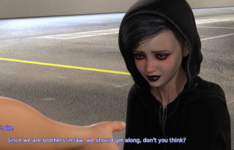
@Neytan, you might already be aware of this translation error, but the MC and Irene would not be brothers-in-law, since only one of them is a male and the other is female. You could just say "Since we are in-laws", because that doesn't assume a gender (or even a sibling vs. a parent-in-law, for that matter).
4 Years of Service

4 Years of Service
Since I still have a long way to go to improve my English, I'm very grateful for all these corrections. Thank you very much. If you see more mistakes I would be very grateful if you report them to me.@Neytan, you might already be aware of this translation error, but the MC and Irene would not be brothers-in-law, since only one of them is a male and the other is female. You could just say "Since we are in-laws", because that doesn't assume a gender (or even a sibling vs. a parent-in-law, for that matter).
Similar threads


- Replies
- 5
- Views
- 2K


