Can the front picture of this game be updated to the new models? Every time I see it I get the feeling I want to play it, then I have to remind myself they destroyed it half way through,
Can the front picture of this game be updated to the new models? Every time I see it I get the feeling I want to play it, then I have to remind myself they destroyed it half way through,
If you have a new or updated version, feel free to upload it here and use the report feature to report your post containing it so that the uploaders can put it in the OP.
No one is preventing you from doing so, and they would certainly appreciate your help - at least some of them .
Why didn't you update the original post right away and include the files along with the relevant information (previews, features, installation instructions, save location, and credit to the creators) instead of parking them here, at the very end of the thread, where no one will find them unless they take the trouble to read through the entire thread and just read the OP to download the game?
Post automatically merged:
Unrelated:
Did I mention already how much I hate that DAMN STUPID AUTO MERGER THINGAMABOB?
Note:
This isn't a criticism, just a personal statement!
Why didn't you update the original post right away and include the files along with the relevant information (previews, features, installation instructions, save location, and credit to the creators) instead of parking them here, at the very end of the thread, where no one will find them unless they take the trouble to read through the entire thread and just read the OP to download the game?
I didn't actually know there was already one; I didn't check. We were updating several games, and there was one that was absolute chaos and had my full attention. Otherwise, I would have done it the way you said, but what's done is done.
I didn't actually know there was already one; I didn't check. We were updating several games, and there was one that was absolute chaos and had my full attention. Otherwise, I would have done it the way you said, but what's done is done.
I'm not blaming you; I was just wondering.
However, the original post is missing some information about the mods and the patch that I think would be important / helpful to the users who are using them.
More people - yeah, that’s a problem.
Unfortunately, I’m just a one-man choir - at least that’s what someone once called me.
With you, we’d at least be a duo and could sing a duet,... that would be a good start.
I'm not blaming you; I was just wondering.
However, the original post is missing some information about the mods and the patch that I think would be important / helpful to the users who are using them.
More people - yeah, that’s a problem.
Unfortunately, I’m just a one-man choir - at least that’s what someone once called me.
With you, we’d at least be a duo and could sing a duet,... that would be a good start.
The post merger thing threw me off when it happened to me the other day. I guess I understand the logic of having it. I just also don't personally care for it. Different strokes for different folks, I suppose...
The post merger thing threw me off when it happened to me the other day. I guess I understand the logic of having it. I just also don't personally care for it. Different strokes for different folks, I suppose...
Can the front picture of this game be updated to the new models? Every time I see it I get the feeling I want to play it, then I have to remind myself they destroyed it half way through,
Hey all, I need a little help here. I will go with this game currently. I downloaded the Update S3E2 to S3E3 Where do I place the update to be able to play. I know simple question but I am a bit lost. Also for the newest update, S3 E4 where do I place the incest patch and the WT mod for S3 E4. Appreciate any help.
Hey all, I need a little help here. I will go with this game currently. I downloaded the Update S3E2 to S3E3 Where do I place the update to be able to play. I know simple question but I am a bit lost. Also for the newest update, S3 E4 where do I place the incest patch and the WT mod for S3 E4. Appreciate any help.
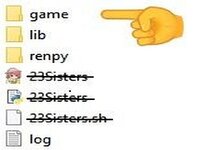
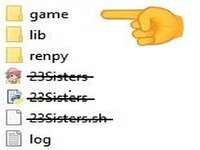
Any files you add to the game later should be placed in the “Game” folder, which is located in the game's main folder - the one named after the game itself.
Any files you add to the game later should be placed in the “Game” folder, which is located in the game's main folder - the one named after the game itself.
Appreciate it. I was a little confused as some of these add ons say unzip to game folder or copy to game folder. I wasn't sure if it made a difference. So, do the same if just the update to a game is downloaded?
Appreciate it. I was a little confused as some of these add ons say unzip to game folder or copy to game folder. I wasn't sure if it made a difference. So, do the same if just the update to a game is downloaded?
It depends on how the update is packaged.
If there are other files, such as a game.exe (game = name of the game), in the game folder (which has the same name as the game), then they won't be placed in the “game” folder.
If the archive contains only one folder named “game”, then they will be placed in the “game” folder.
Copy/Move and overwrite existing files.
It depends on how the update is packaged.
If there are other files, such as a game.exe (game = name of the game), in the game folder (which has the same name as the game), then they won't be placed in the “game” folder.
If the archive contains only one folder named “game”, then they will be placed in the “game” folder.
Copy/Move and overwrite existing files.
I placed update patch 3.2 to 3.3 into the S3 E2 game folder. I received the following message.
While loading the script.
ScriptError: Name ('game/tl/english/1gallery_rep.rpy', 1622469218, 6) is defined twice, at game/Update_patch_3_2_to_3_3/game/tl/english/1gallery_rep.rpyc:6 and game/tl/english/1gallery_rep.rpy:6.
ScriptError: Name ('game/tl/english/1gallery_rep.rpy', 1622469218, 6) is defined twice, at game/Update_patch_3_2_to_3_3/game/tl/english/1gallery_rep.rpyc:6 and game/tl/english/1gallery_rep.rpy:6.
*It looks like you've extracted the archive.
You then copied the “Update_patch_3_2_to_3_3” folder into the folder named “game,” instead of the files that are in the folder named “game” that the archive contains.*
If you're really having trouble, I recommend downloading the archive with the new game version instead of the one with the update.
It's bigger, but it'll save you the hassle you're currently experiencing.
I placed update patch 3.2 to 3.3 into the S3 E2 game folder. I received the following message.
While loading the script.
ScriptError: Name ('game/tl/english/1gallery_rep.rpy', 1622469218, 6) is defined twice, at game/Update_patch_3_2_to_3_3/game/tl/english/1gallery_rep.rpyc:6 and game/tl/english/1gallery_rep.rpy:6.
Which version of the game are you using?
This patch is for game version 3.3 and is intended to update the game to version 3.4.
TheAssistant-3.3_to_3.4-Update_patch
*EDIT:
*It looks like you've extracted the archive.
You then copied the “Update_patch_3_2_to_3_3” folder into the folder named “game,” instead of the files that are in the folder named “game” that the archive contains.*
If you're really having trouble, I recommend downloading the archive with the new game version instead of the one with the update.
It's bigger, but it'll save you the hassle you're currently experiencing.
Post automatically merged:
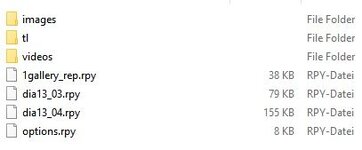
Here's a quick recap:
Unzip the update archive.
It contains a folder named “game”.
This folder contains the following files:
So I have the following Season 1, Season 2 Season 3 E 2, I had no problem playing these. I believe these were the total download of the story. Then when I saw it avalable I down loaded just the update patch 3-2 to 3-3. I never used the update as I was unsure of what to do with it. I then downloaded the newest S3 E4. So here I sit. I have all of these down loaded in my gaming file. I am going to ask another question because I am ignorant. When I new release comes out. Does it usually contain the entire previous story plus what is new for that release? You are being very patient. Thanks.
So I have the following Season 1, Season 2 Season 3 E 2, I had no problem playing these. I believe these were the total download of the story. Then when I saw it avalable I down loaded just the update patch 3-2 to 3-3. I never used the update as I was unsure of what to do with it. I then downloaded the newest S3 E4. So here I sit. I have all of these down loaded in my gaming file. I am going to ask another question because I am ignorant. When I new release comes out. Does it usually contain the entire previous story plus what is new for that release?
That’s a question that can’t be answered in general terms, especially since the game is still in the development phase overall, and each developer decides for themselves whether to compile the individual sessions/chapters after completion and release the game as a complete package or not.
This decision often depends on whether the total size exceeds a certain file size or not; as a rule, this is around 5GB.
Furthermore, it depends on whether there was an update to the game engine during development or if there were changes to the rendering, which can result in the individual parts no longer being compatible with each other - a situation that can lead to issues with save games and other conflicts.
A good way to determine for yourself - if it isn’t specified anywhere in the game description - whether a subsequent version includes the previous versions / chapters is to look at the file size of the download and compare them.
If it is significantly larger than that of the previous version, it likely includes them.
If it is roughly the same, it is likely just a section and requires downloading all other parts released up to that point.
Since I don't personally own this game, haven't played it yet, and won't play it until it's either completed or abandoned, I'm assuming this is a version that includes all the previous parts.
So you can probably just delete the individual parts you’ve collected so far and focus on installing the patch (not the update) and mods - you already know how that works.
You're welcome.
And feel free to ask any questions you have - that's what the forum is for.
And if I don't know the answer or start spouting nonsense, there are definitely others who'll be happy to help you out or tell me I'm wrong, - and hopefully I'll learn from it.






 +
+ 

 folder and replace the existing files with the new ones.