
You are using an out of date browser. It may not display this or other websites correctly.
You should upgrade or use an alternative browser.
You should upgrade or use an alternative browser.
Complete RPGM Hand Drawn House Chores [v1.2.1] [Siren's Domain]
- Thread starter Fallen Angel Productions
- Start date
- Replies 163
- Views 28K
- Notice
- Updated due to the game being leak elsewhere.


1/3
4 Years of Service
HDR Fix Made By ArcFlight
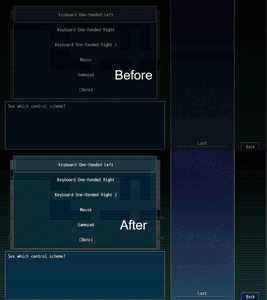
If you have an HDR monitor and have HDR enabled, you might notice some (all?) RPG Maker MV games look dim with whites looking grey.
RPGM MV, at the time of writing this, uses Chromium 65, from NW.js 0.29, to display the games. You can check this out in games with the console enabled by pressing F8 or F12 and entering process.versions into the console.
This version of Chromium is old (Jan 2018). And since Chromium 64 added HDR support, appears to be a bug in 65. HDR appears to have been fixed in Chromium somewhere between 65 and 86.
After some limited success Googling, I've discovered two ways to fix this.
Fixes:
Option 2, Update NW.js:
This option may boost game performance due to using a newer version of Chromium. It may also break the game.
Note: I haven't confirmed this issue exists on anything other than Windows 10. Please let me know if it is just a Windows or Windows 10 issue. Thanks!
Credits: Guide adapted from info from . helped figure out what was to blame.
If you have an HDR monitor and have HDR enabled, you might notice some (all?) RPG Maker MV games look dim with whites looking grey.
RPGM MV, at the time of writing this, uses Chromium 65, from NW.js 0.29, to display the games. You can check this out in games with the console enabled by pressing F8 or F12 and entering process.versions into the console.
This version of Chromium is old (Jan 2018). And since Chromium 64 added HDR support, appears to be a bug in 65. HDR appears to have been fixed in Chromium somewhere between 65 and 86.
After some limited success Googling, I've discovered two ways to fix this.
Fixes:
- Force sRGB rendering. (Easy)
- Update NW.js. (Easy to Hard, may break the game you are updating, may also improve performance)
- Disable HDR in Windows HD Colour settings every time you run an RPGM game. (Easy but stupid
 )
)
- Open the directory with the game executable in it.
- Mac users... rename Game.app to just Game so you can open it as a directory, then navigate to Contents/Resources/app.nw.
- Open package.json (might just be named package).
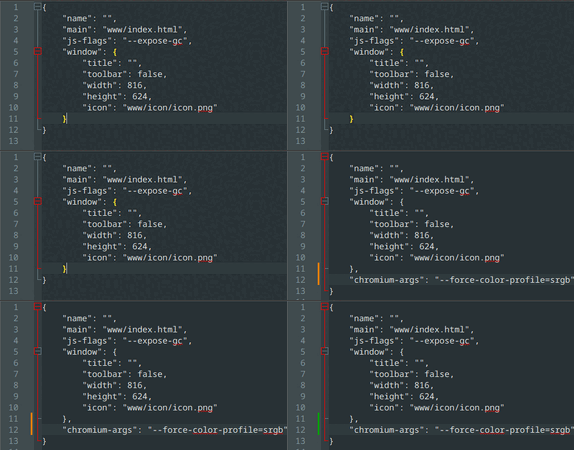
- Add the following line "chromium-args": "--force-color-profile=srgb".
Your package file might be significantly different depending on the game. Just add it before the final curly brace }.
Make sure the previous line has a comma! See the GIF below if confused. - Save.
- Done. Launch the game. Enjoy.
Option 2, Update NW.js:
This option may boost game performance due to using a newer version of Chromium. It may also break the game.
- Back up your game or prepare to re-download it in case you break it!
- Open the directory with the game executable in it.
- Download the appropriate version of NW.js from
You must be registered to see links.
See the spoiler for a simpler choice of what to download.- Pick one starting with nwjs-sdk-v0.49.2 if you want to enable the console.
- Pick one starting with nwjs-v0.49.2 if you don't want to enable the console and save some disk space.
- On Windows, pick one ending -win-ia32.zip.
- On Mac, pick one ending -osx-x64.zip.
- On Linux, pick one ending -linux-x64.tar.gz.
- Extract the contents of that zip (or tar.gz) overtop the game, replacing any files when asked.
- Delete Game.exe, Linux and Mac users skip to step 7.
- Rename nw.exe to Game.exe.
- Done. Launch the game. Enjoy.
| Platform | I don't want the developer console | I do want the developer console! |
| Windows (32-bit or 64-bit) |
You must be registered to see links
|
You must be registered to see links
|
| Linux 64-bit | ||
| Mac 64-bit |
Credits: Guide adapted from info from . helped figure out what was to blame.


1/3
3 Years of Service
A good game, quite potential. The plot is not too new but still creates attraction. In addition, the conversations between the characters are also meticulously elaborated, not creating a feeling of boredom. I really hope to see more interesting content, develop the character lines as well as expand the cast of characters, such as Aunt Julie's daughter, or the female neighbors. And what I'm most looking forward to is that MC can get girls pregnant and become his sex slaves.

ツSisterSexualシ
꧁꧂SisterSexual Siscest꧁-꧂LesboSexual SisterPhile꧁꧂
Registered
Lewd
Prestige 1
Prestige 4
Prestige 5
1/3
2 Years of Service
Reminded me of summertime saga, good arts and story 

U
User_19378
Unconfirmed
Really good game made in shitty engine. Skip it until it gets more updates


Similar threads

- Replies
- 1
- Views
- 547


- Replies
- 2
- Views
- 554
Legal Notice
This site provides links to other sites/services, and does not store any files