

1/3
1 Year of Service
- Allow others to update?
- no
- Developer Name
- TranceParentDev
- Developer Links
- Version
- 0.6.7
- Latest Update
- Jul 31, 2025
- Release Date
- Jan 11, 2025
- Language
- English
- OS
- Windows
- Linux
- MacOS
- Android
Overview:
TranceParent is a new way to view your media! You can use it to do self hypnosis, goon your brains out, femdom hypno, make custom PMVs or whatever else you can imagine. It works by letting you load in a folder of images, gifs, videos, mp3s or other media into semi-transparent layers. Then it will randomly cycle through those media files even allowing you to create spirals out of any images. Set up multiple layers with different transparency levels and you can stack up the perfect combination. There are many other features as well!
Real Porn, Animated, Voiced, Mind control, Mobile Game, Creampie, Female domination, Handjob, Milf, Oral Sex, Vaginal sex, CEI, JOI, Cum, Gooning, Femdom, PMV, Whatever media/fetish you want to add
1. Extract and run.
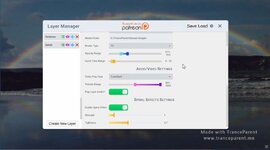
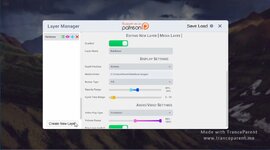
2. Click the icon in the upper left and create a layer
3. Click the Media Folder field to browse to a folder of your media
4. Enable the Layer
5. Enjoy!
If you need help figuring out how to create layers or add media, watch the youtube video here:
2. Click the icon in the upper left and create a layer
3. Click the Media Folder field to browse to a folder of your media
4. Enable the Layer
5. Enjoy!
If you need help figuring out how to create layers or add media, watch the youtube video here:
You must be registered to see media
After doing some more tests with save files in version 0.6.5 I found that layers with effects attached that were saved, did not load properly and broke. I also found that sometimes layers would load and not be able to cycle. These bugs were fixed, however old save files will still have these bugs, so you'll need to create new save files. You can also load old saves and then delete and remake the bugged layers to create new save files with the fixes.
Change Log
Change Log
- Fixed a bug preventing layers with effects from displaying properly when loaded from a save
- Fixed a bug that prevented layers from cycling properly when loaded from a save
So this update includes a lot of changes behind the scenes for Effects, including the ability to utilize multiple effects even the ones previously marked as a shader effect. This required merging the shaders into one mega shared shader and having the code only enable the features as needed. Also a new effect was added called Horizontal Split for creating scenes with split screens.
Horizontal Split Effect
With the Horizontal Split Effect each section is its own layer and you can specify via a percentage where to start it and how wide it is. For example to do a 3 way split like in the above video, you need to make the first layer start at 0% and have a width of 33%. The second layer should start at 33% and have a width of 34% and the third should start at 67% and have a width of 33%. This gives you the above effect, you can do half and half or anything else you can imagine.
Record Video Updates
Some upgrades have been made to the video recording feature to make it not only more well known but also easier to use. First there are 2 new settings added:

Output path lets you select where the videos are saved to, this makes it much easier for you to find them when you are finished.
Show Record Button provides a button in the bottom right corner that lets you toggle starting and stopping the video recording.
Another nice extra feature is that while you're recording it will show a blinking red dot in the upper right corner of the screen to let you know that a recording is happening.
Lastly, the Layer Manager Button, Record button, Blinking Dot and texts notifying you of recording starting and stopping do NOT show up in your recording now, ensuring your recording is going to be at its best!
Change Log
Horizontal Split Effect
With the Horizontal Split Effect each section is its own layer and you can specify via a percentage where to start it and how wide it is. For example to do a 3 way split like in the above video, you need to make the first layer start at 0% and have a width of 33%. The second layer should start at 33% and have a width of 34% and the third should start at 67% and have a width of 33%. This gives you the above effect, you can do half and half or anything else you can imagine.
Record Video Updates
Some upgrades have been made to the video recording feature to make it not only more well known but also easier to use. First there are 2 new settings added:
Output path lets you select where the videos are saved to, this makes it much easier for you to find them when you are finished.
Show Record Button provides a button in the bottom right corner that lets you toggle starting and stopping the video recording.
Another nice extra feature is that while you're recording it will show a blinking red dot in the upper right corner of the screen to let you know that a recording is happening.
Lastly, the Layer Manager Button, Record button, Blinking Dot and texts notifying you of recording starting and stopping do NOT show up in your recording now, ensuring your recording is going to be at its best!
Change Log
- Effects are now compatible with each other! Even ones previously marked shader!
- Recordings properly capture sound again
- When adding an effect it should always show up without having to reload the layer
- When creating a new layer it now scrolls to the top
- If too many effects are added the scroll-able section of the settings now expands properly to fit it.
- New Effect called Horizontal Split added for Hypno Enthusiasts
- Recording Settings added for Save Location and Show Button
- You can now have a toggle button for recording videos show up on the screen in the bottom right
- It now shows a blinking red dot in the upper right while you are recording
- Text notifications no longer show up in recordings
- The Layer Manager button no longer shows up in recordings
- Misc Other Bug Fixes
I've been wanting to make this system for a while now and now that its ready, its gonna change everything! Effects can be added to your layers by clicking the Add Effect button at the bottom of the Layer Settings for each layer. There are currently some limitations and probably quite a few bugs with some of these effects, so feel free to play around with them and report any issues found on discord.
Currently you'll only be able to have one "Shader" Effect active per layer, these effects have (Shader) in the name so that its clear. In the future this won't be an issue as there are ways to overcome this limitation, but they are a bit complicated so I've delayed that. Also if after adding a setting to the layer, it doesn't show the options for it, simply click the layer in the left bar to reload the settings. This is a bug that occasionally happens.
Here is a list of the effects coming in this release:
Spiralfy (Shader) - Free
This effect distorts the layer to create a spinning spiral out of the image data and has settings to adjust the speed, strength and direction of the spiral. This is the same effect that was in previous releases, but includes an update to allow changing the direction by moving the Time Scale to the negatives.
Colorize Lite - Free
This effect lets you adjust the RGB color values of the media layer. It has sliders for Red, Green and Blue values as well as a slider for Brightness. Because it doesn't use a shader it has some limitations, thus the Lite name. In the future a shader version of this will be released that is able to have a much stronger effect.
Monochromatic (Shader) - Supporter
This effect strips the colors from your media layer dropping it down to Black & White, the settings provided make it much more special than that however! You can adjust the strength of the effect to bring back some of the color as well as change the colors for black and white making it whatever combination of colors you'd prefer. If you choose a color other than black and white, you'll need to increase the saturation level to ensure you can see it. You can also adjust contrast and brightness for some really cool effects!
Strobe Lights - Supporter
This causes the layer to have a strobe light effect that flashes a light with varying frequency. This effect comes with a warning not to use it if you are prone to seizures or have epilepsy as it can potentially trigger seizures. It has settings for Frequency, Intensity, Duration, Randomization and Strobe Color. If it doesn't begin flashing right away when you add it to your layer, you may need to set the color, white should be fine to use, but you can also change it to any other color you prefer.
Fader - Hypno Enthusiast
This effect causes the media layer to fade in and out according to a pattern and following the limits you choose. The Minimum and Maximum Range settings controls the opacity ranges that it will fade between. The Fade speed controls how fast it cycles. Fade Pattern is the pattern it uses to transition between the ranges specified and lastly Override Opacity ensures that it follows this pattern without being reset each time the media layer cycles.
Glitchy (Shader) - Hypno Enthusiast
This is a big one, it will likely be split up into multiple effects in the future as its really made up of a bunch of different effects. The primary Glitch effect has Intensity and Frequency Settings it causes the layer to shake or twitch in different ways. RGB Split has Amount and Speed and it causes the colors to split and slide around. Scan Lines has Intensity, Speed and Count and applies a scan lines effect based on old tv screens. Digital Distortion has Amount and Speed settings and applies a twisting effect on the Media layer that goes back and forth. Color Shift has Amount and Speed and it is similar to RGB Split but shifts all the colors on top of the regular image like a ghost image. Lastly Noise has Intensity and scale and applies a noise pattern to the image. All of these sub effects can be disabled by turning the amount or intensity values to 0.
Change Log:
Currently you'll only be able to have one "Shader" Effect active per layer, these effects have (Shader) in the name so that its clear. In the future this won't be an issue as there are ways to overcome this limitation, but they are a bit complicated so I've delayed that. Also if after adding a setting to the layer, it doesn't show the options for it, simply click the layer in the left bar to reload the settings. This is a bug that occasionally happens.
Here is a list of the effects coming in this release:
Spiralfy (Shader) - Free
This effect distorts the layer to create a spinning spiral out of the image data and has settings to adjust the speed, strength and direction of the spiral. This is the same effect that was in previous releases, but includes an update to allow changing the direction by moving the Time Scale to the negatives.
Colorize Lite - Free
This effect lets you adjust the RGB color values of the media layer. It has sliders for Red, Green and Blue values as well as a slider for Brightness. Because it doesn't use a shader it has some limitations, thus the Lite name. In the future a shader version of this will be released that is able to have a much stronger effect.
Monochromatic (Shader) - Supporter
This effect strips the colors from your media layer dropping it down to Black & White, the settings provided make it much more special than that however! You can adjust the strength of the effect to bring back some of the color as well as change the colors for black and white making it whatever combination of colors you'd prefer. If you choose a color other than black and white, you'll need to increase the saturation level to ensure you can see it. You can also adjust contrast and brightness for some really cool effects!
Strobe Lights - Supporter
This causes the layer to have a strobe light effect that flashes a light with varying frequency. This effect comes with a warning not to use it if you are prone to seizures or have epilepsy as it can potentially trigger seizures. It has settings for Frequency, Intensity, Duration, Randomization and Strobe Color. If it doesn't begin flashing right away when you add it to your layer, you may need to set the color, white should be fine to use, but you can also change it to any other color you prefer.
Fader - Hypno Enthusiast
This effect causes the media layer to fade in and out according to a pattern and following the limits you choose. The Minimum and Maximum Range settings controls the opacity ranges that it will fade between. The Fade speed controls how fast it cycles. Fade Pattern is the pattern it uses to transition between the ranges specified and lastly Override Opacity ensures that it follows this pattern without being reset each time the media layer cycles.
Glitchy (Shader) - Hypno Enthusiast
This is a big one, it will likely be split up into multiple effects in the future as its really made up of a bunch of different effects. The primary Glitch effect has Intensity and Frequency Settings it causes the layer to shake or twitch in different ways. RGB Split has Amount and Speed and it causes the colors to split and slide around. Scan Lines has Intensity, Speed and Count and applies a scan lines effect based on old tv screens. Digital Distortion has Amount and Speed settings and applies a twisting effect on the Media layer that goes back and forth. Color Shift has Amount and Speed and it is similar to RGB Split but shifts all the colors on top of the regular image like a ghost image. Lastly Noise has Intensity and scale and applies a noise pattern to the image. All of these sub effects can be disabled by turning the amount or intensity values to 0.
Change Log:
- Changed the way Full Screen works to hopefully improve the way it works.
- Fixed a bug with the Font Size Slider in the Text Layer.
- Added Instructions on the default Layer Manager window for drag and drop of left bar items.
- Added a new Preview Mode button which hides the Layer Manager window until you click again so you can quickly see what the current session looks like with your current settings. You can also hold the space bar to enter preview mode, letting go of the space bar exits it.
- Added Recursive Folder support ( aka sub folders) so that it will load not just the media in the folder selected but also all sub folders. Be careful with this as it could potentially load way too many files if you have a very nested folder.
- Spiralfy now allows you to change the direction by using negative Time Scale values.
- Added a new Effects button to the Media Layer Settings at the bottom for adding Effects to your layers.
- Added Spiralfy, Colorize Lite, Monochromatic, Strobe Lights, Fader and Glitchy Layer Effects.
- Added notifications for expired unlock codes
- Added notification system for future use of errors and notices
- Recoded the way the unlock code system works on the back end to include messages
- Other Bug Fixes
One of the major things that has been needing attention is the Text Layer, this update addresses that and fixes the bugs with the layer positions and even adds some new ones.
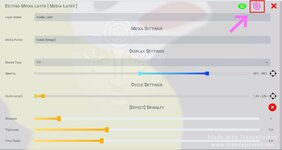
It also has the first part of the Effects system created. For now the only effect is the spiral effect that was previously just baked into the Media Layer. Now you can add this effect by clicking on the Spiral Icon in the upper right corner of the layer settings for any media layer. You can remove the effect by clicking on the red X button on the section in the layer settings for the effect.
In the future there will be a button for add effect at the bottom of the layer settings, which will prompt a menu that provides a list of available effects for the layer type you're on. I think this feature will be very exciting and constantly expanding with new layer effects for all layer types. It will also allow us to keep the settings simple and clean, only adding the settings for your desired features.
Change Log and Bugfixes:
It also has the first part of the Effects system created. For now the only effect is the spiral effect that was previously just baked into the Media Layer. Now you can add this effect by clicking on the Spiral Icon in the upper right corner of the layer settings for any media layer. You can remove the effect by clicking on the red X button on the section in the layer settings for the effect.
In the future there will be a button for add effect at the bottom of the layer settings, which will prompt a menu that provides a list of available effects for the layer type you're on. I think this feature will be very exciting and constantly expanding with new layer effects for all layer types. It will also allow us to keep the settings simple and clean, only adding the settings for your desired features.
Change Log and Bugfixes:
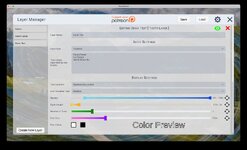
- Redesigned Text Layer Settings
- Fixed the bug with Randomized Location Avoid Center Text Location
- Added Bottom Text Location
- Added Top Text Location
- Converted Opacity into a multi slider type
- Converted Cycle Length into a multi slider type
- Converted Number of Texts into a multi slider type
- Merged Font Height and Font Width Range sliders into Font Size which is now a multi slider
- Merged the font colors into a single row for color and outline color (also fixed the bugs with them)
- Added a Color Preview next to the colors so that you can see what the text should look like
- Moved Spiral Settings behind new Effects Feature
- Click the spiral icon in the upper right of a media layer to add new Spiralfy Effect
- The sliders should now show up and allow you to change the settings which will apply to the layer
- Clicking the red X next to the effect section deletes the effect
- Fixed Android Bugs
- Save and Load buttons should now work on any version of android
- The settings button should now work on any version of android
- Fixed the bug that caused media layers to stop cycling and get stuck (they got stuck usually because of a codec error with webm files, it should now handle them gracefully)
- Fixed a bug where layer ordering drag and drop in the left menu sometimes didn't work
- Fixed a bug that prevented the app from closing, requiring you to force close the app sometimes
So this is a huge update. It fixes so many bugs and releases a new smart layer system. It also makes so much of the Layer Settings easier to use.
Instead of extra settings to change the position of the layer, you can now just drag and drop it in the left bar.
You can double click the layer name in the left bar to enable and disable it.
There's a new Multi Type Slider system where range sliders can be toggled to normal sliders or input fields or even disabled just by clicking a button on the right side of the slider.
You'll have to see it to believe it!
As Supporters you guys will be the first to get to test and use this version, please provide feedback so I can fix the bugs and make it even better!
Change Log:
Instead of extra settings to change the position of the layer, you can now just drag and drop it in the left bar.
You can double click the layer name in the left bar to enable and disable it.
There's a new Multi Type Slider system where range sliders can be toggled to normal sliders or input fields or even disabled just by clicking a button on the right side of the slider.
You'll have to see it to believe it!
As Supporters you guys will be the first to get to test and use this version, please provide feedback so I can fix the bugs and make it even better!
Change Log:
- Layer Manager now allows drag and drop re-ordering of layers to determine the layer position
- Double clicking a layer in the left bar now enables or disables the layer
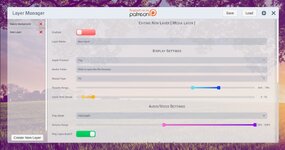
- New Multi Type Sliders are introduced in the Media Layer, these have a button on the right side that lets you choose how you want to set the value. Range allows you to select a minimum and maximum, Slider allows you to slide to select a value, Input Field allows you to type in your value and disabled allows you to disable the setting.
- New Smart Media Layer System, it now only shows the Media Folder and Name option until you select a folder. It then changes the settings displayed based on the types of media in this folder. This should simplify which settings show so settings that are not relevant don't show up.
- Enable Toggle for layers now shows up as a button in the upper right when editing layer settings
- Delete Layer button now shows up in the upper right when editing layer settings
- Volume slider and mute button now merged into one Multi Type Slider
- Memory Leaks with GIF and Audio files are now fixed and should make the app work really well on even older devices
- Audio files now no longer lock up the app when they are being loaded
- Audio files now stream when loading so that they begin playing right away
- Other minor bugs fixed
There were some bugs with App transparent settings and Android file browsing on some devices.
Patch Notes:
• Enlarged Settings and Close button
• Spaced out the buttons in the upper right corner of Layer Manager
• Fixed a bug with App transparency functions and settings not saving properly
• Fixed more bugs with Android file menus for selecting folders and save / load
Patch Notes:
• Enlarged Settings and Close button
• Spaced out the buttons in the upper right corner of Layer Manager
• Fixed a bug with App transparency functions and settings not saving properly
• Fixed more bugs with Android file menus for selecting folders and save / load
A somewhat minor release considering we just released version 0.4.0 yesterday, however there were some bugs I wanted to get fixed and there were some nice UI improvements made as well. Without further delay here's what's changed.
Patch Notes:
• Converted the Layer Manager to be semi transparent allowing you to see changes as you make them
• Added a label to the Media Folder Browse button saying "Click to open the file browser"
• Re-arranged and resized the buttons in the upper right of the Layer Manager to make them easier to click and interact with on Android ( and look better on all platforms )
• Other minor UI tweaks
Patch Notes:
• Converted the Layer Manager to be semi transparent allowing you to see changes as you make them
• Added a label to the Media Folder Browse button saying "Click to open the file browser"
• Re-arranged and resized the buttons in the upper right of the Layer Manager to make them easier to click and interact with on Android ( and look better on all platforms )
• Other minor UI tweaks
Current Unlock codes from Patreon are "deeper625" for the Supporter Role and "inatrance625" for the Hypno Enthusiast Role. Please support us on patreon if you can though, we really need it, as I've got an insane number of features I wanna build, but can't afford to spend the time on currently. Every dollar helps!
You can record videos of your sessions by pressing Ctrl/Cmd + R to start and stop recording.
The arrow keys allow you to switch selected layer ( up and down ) and goto the next media file ( left and right )
Layer Types:
Media: Supported formats - gif, jpg, png, bmp, mp4, mov, ogv, mpg, m4v, mp3, ogg, wav, flac, aif, webm, webp
Cycles through a folder of media files randomly displaying them with different effects and transparencies on the layer level you choose.
Text: Displays lines from a text file or text area randomly throughout the screen with font sizes, colors and outlines you choose.
Binaural: Plays a Binaural beat to help change the state of the listener's mind making them more suggestible or whatever else depending on the frequencies you set
Metronome: Plays a metronome sound effect that is customizable with settings for sound type, tempo and beats per bar
You can record videos of your sessions by pressing Ctrl/Cmd + R to start and stop recording.
The arrow keys allow you to switch selected layer ( up and down ) and goto the next media file ( left and right )
Layer Types:
Media: Supported formats - gif, jpg, png, bmp, mp4, mov, ogv, mpg, m4v, mp3, ogg, wav, flac, aif, webm, webp
Cycles through a folder of media files randomly displaying them with different effects and transparencies on the layer level you choose.
Text: Displays lines from a text file or text area randomly throughout the screen with font sizes, colors and outlines you choose.
Binaural: Plays a Binaural beat to help change the state of the listener's mind making them more suggestible or whatever else depending on the frequencies you set
Metronome: Plays a metronome sound effect that is customizable with settings for sound type, tempo and beats per bar
| Title - Uploader | Post | Link(s) | Description |
| Pussy Worship - Zoey | Discord |
You must be registered to see links
| 6 Layers with 3 audio files, 84 static pictures and 5 gifs featuring themes of becoming a slave to pussy Updated to version 0.6.7 |
| Eat Your Cum - Zoey | Discord |
You must be registered to see links
| 7 Layers with 3 audio files, 83 Caption Images, 235 Regular Images, 9 Spiral Videos, 166 gifs featuring themes of eating your own cum, eating the cum from your wife's pussy after sex, cumming into your mouth and general CEI Updated to version 0.6.7 |
DOWNLOAD
Win:
Linux: - -
Mac: - -
Android: - -
Win:
You must be registered to see links
- - Linux: - -
Mac: - -
Android: - -
Last edited by a moderator:









 !
! 


