Creating your first game thread
You can do this without being an official uploader
NOTE FOR UPLOADERS: CHECK DISCORD FOR THE BANNED DEVS LIST BEFORE POSTING THE GAME IF YOU CAN'T REMEMBER ALL THEIR NAMES
First, you will create the thread HERE (you don't have permission to create it inside the games area yet)
Unfortunately, we haven't added the game template inside the requests area yet, but you should see a page like
You can do this without being an official uploader
NOTE FOR UPLOADERS: CHECK DISCORD FOR THE BANNED DEVS LIST BEFORE POSTING THE GAME IF YOU CAN'T REMEMBER ALL THEIR NAMES
First, you will create the thread HERE (you don't have permission to create it inside the games area yet)
Unfortunately, we haven't added the game template inside the requests area yet, but you should see a page like
(Note for uploaders: if the game is on F-95 should be posted in the Games area and not Games+, doesn't matter the tags )

Yes, we have a template, ready to be filled with your game info, the template already has BBCODE to make your life easier, here is the code, so you can paste it inside your thread
Yes, we have a template, ready to be filled with your game info, the template already has BBCODE to make your life easier, here is the code, so you can paste it inside your thread
Code:
[CENTER](Cover Art goes here)

[SIZE=5][B]Overview:[/B][/SIZE]
(Game/Description Here...)[/CENTER]

[SPOILER=Genre:]
IMPLEMENTED AND/OR FUTURE FEATURES. DELETE TEXT IF NOT USED.
[/SPOILER]
[SPOILER=Installation]
Extract and Run
[/SPOILER]
[SPOILER=Change-Log]
CHANGE-LOG HERE. DELETE IF NO CHANGE-LOG AVAILABLE
[/SPOILER]
[SPOILER=Dev Notes]
Dev notes here
[/SPOILER]

[CENTER][SIZE=5][B]DOWNLOAD
Win/Linux[/B]: LINK - LINK - LINK- LINK - ETC...
[B]Mac[/B]: LINK - LINK - LINK - LINK - ETC...
[B]Android[/B]: LINK - MEGA - LINK - LINK - ETC...

(Samples/Screenshots, if more than 5, add them in spoilers with 5 shown, DELETE OTHERWISE)[/SIZE][/CENTER]
To insert screenshots, start by clicking on
Once all are uploaded click on
The fastest way is to click on "Select all", then deselect your Main image (which should be the one on the far left) and click on "Thumbnail".
If you need your previews to be within a "Spoiler" box, add the top and bottom "SPOILER" lines as in this screenshot.
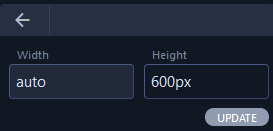
To resize the images, click on the image and then "Change size"
The banner should have a 600px height and "auto" width
As for thumbnails, just use the "insert" function and they will have the right size automatically
-----------
Now, for the options
That should be marked as "yes", some devs will mark it as "no" when they like to update the game themselves (if you don't have that box, just ignore it for now)
-----------
if the developer has other games on LC, you should link them here, using the URL option (a link for the search of the dev is an option too and can save you some time)
-----------
Tags should be added here, separated by commas (you can find them in the "genre" section)
If you're trying to add a tag that we don't have the site will not let you, but feel free to suggest a tag if you think we should have it[/SPOILER][/CENTER]